


Computer to TV,,how do u do it?


Thread Starter
|
Senior Member
Joined: Jan 2005
Posts: 503
From: Tarpon Springs, FL
 Computer to TV,,how do u do it?
I have a 57" Hitachi and I want to hook up my computer to it. Bought a cable that on one end it hooks to my computer and the other end has the red green and blue connections. When hooked up to my TV and I select the right source I get a bunch of squiggly lines. What is the correct way to do this.
I plan on going to a wireless keyboard once I figure this out so I can veg on the couch while surfing.
Would it make it easier if I snapped a pic of the back of my TV and the cable I bought?
I plan on going to a wireless keyboard once I figure this out so I can veg on the couch while surfing.
Would it make it easier if I snapped a pic of the back of my TV and the cable I bought?

Thread Starter
|
Senior Member
Joined: Jan 2005
Posts: 503
From: Tarpon Springs, FL
Ok, I think I might have screwed up. Went back and looked at the cable I bought off ebay. Didn't read all the way down. It specifically says it's for HDTV and is not a computer monitor cable. Let's see if this link works. This is what I bought.
http://cgi.ebay.com/ws/eBayISAPI.dll...0526&rd=1&rd=1
I'll get ya a pic of the back of the TV shortly. Thanks.
http://cgi.ebay.com/ws/eBayISAPI.dll...0526&rd=1&rd=1
I'll get ya a pic of the back of the TV shortly. Thanks.
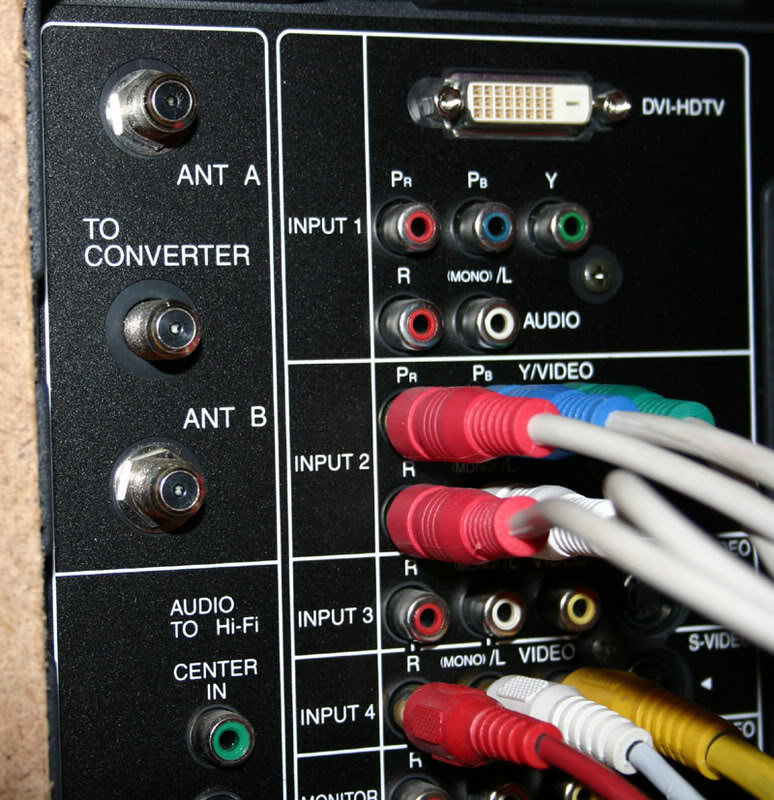
Thread Starter
|
Senior Member
Joined: Jan 2005
Posts: 503
From: Tarpon Springs, FL
Input 2 is currently the box from Brighthouse
Input 4 is used for my DVD player.
Just for kicks n giggles I checked the back of the box that Brighthouse provided and I can't even use the cable that I have in their box. Im not that technical when it comes to this so excuse my ignorance.
Input 4 is used for my DVD player.
Just for kicks n giggles I checked the back of the box that Brighthouse provided and I can't even use the cable that I have in their box. Im not that technical when it comes to this so excuse my ignorance.

Senior Member
Joined: Jul 2005
Posts: 5,796
From: Downingtown/West Chester, PA
if you can, use that DVI-HDTV plug. it is a basic monitor plug that is on most lcd/plasma tv's. look on the back of your computer to see if you have that white plug. if you dont, i thnk they make an adaptor so you can plug the monitor cord (blue plug on computer) to the white.
Thread Starter
|
Senior Member
Joined: Jan 2005
Posts: 503
From: Tarpon Springs, FL
got my answer already. For those of you wanting to do this:
If your computer has a TV Tuner card you should have an S-video jack and also a yellow RCA. just run that from the 'puter to the TV.
Only other thing you have to do is go into the properties of the TV Tuner card and select (2) monitors. that's if you don't get a pic on the TV. Already have the fix for stereo as well so I can play my MP3's through the TV.
If your computer has a TV Tuner card you should have an S-video jack and also a yellow RCA. just run that from the 'puter to the TV.
Only other thing you have to do is go into the properties of the TV Tuner card and select (2) monitors. that's if you don't get a pic on the TV. Already have the fix for stereo as well so I can play my MP3's through the TV.
Thread Starter
|
Senior Member
Joined: Jan 2005
Posts: 503
From: Tarpon Springs, FL
Well, my ATI TV Tuner card has both an s-vid and yellow rca jack, but guess what,,,those are all inputs. Had to go to ebay and purchase a new card that can convert the outgoing signal so I can get it to work on the Tv. No need to buy the $80 ATI card,,got mine off ebay for $22 + shipping. I'll post a pic when it's finished.

Super Moderator
Joined: Sep 2004
Posts: 6,075
The best option would of been to use a VGA port if your TV supports it. Issue with using a DVI port is that the TV might not support the resolution that your PC is running at so you may try to lower your resolution but most DVI connections are not made to accept a computer signal. The physical cable may fit but resolution is the issue and not the physial cable connection. Check your owners manual it will state whether or not you can connect your PC to the DVI. Its better to use the S vid connection over the Composite or Yellow RCA cable but none of the above will be as good as VGA.

Thread
Thread Starter
Forum
Replies
Last Post